

Some ChatGPT conversations are nobody else’s business. Maybe it’s a draft resignation letter, a question about a medical test result, or a long chat planning a surprise for your partner. If you share a laptop, hand your phone to your kids, or just don’t like the idea of someone scrolling through your sidebar, the option to lock chats in ChatGPT is worth five minutes of your time. If you’re still getting to know the app, our guide to what ChatGPT is and how it works covers the basics first.
This guide shows you how to set it up on any device, where locked chats go, how to open them again, and what happens if you forget your PIN (that last part matters more than you’d think). We’ll also be honest about what this feature does not protect, because it isn’t a privacy setting in the way most people assume. If privacy is your main worry, pair it with our walkthrough on turning off ChatGPT’s ad tracking.
In this article 13 sections
- Quick answer: how do you lock a chat in ChatGPT?
- What ChatGPT locked chats actually do
- What you need before you start
- How to lock chats in ChatGPT, step by step
- Where are locked chats in ChatGPT, and how do you open them?
- How to unlock a chat in ChatGPT
- Forgot your ChatGPT PIN? Read this before you reset it
- What locked chats do not protect
- Which chats can’t be locked?
- Locked chats vs Temporary Chat: which should you use?
- Tips for using locked chats well
- ChatGPT locked chats not showing? Try these fixes
- FAQs
Quick answer: how do you lock a chat in ChatGPT?
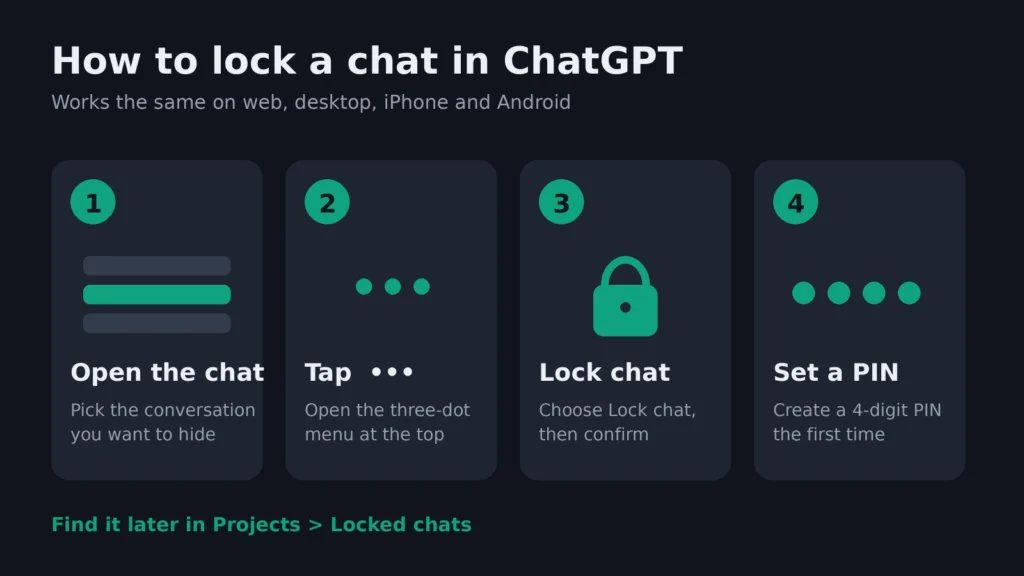
Open the conversation, tap the three-dot menu (•••), choose Lock chat and confirm. The first time you do this, ChatGPT asks you to create a 4-digit account PIN. After that, the chat disappears from your history, pinned chats and search, and lives in a protected Locked chats area under Projects. You open it again with your PIN or, on phones that support it, Face ID, Touch ID or your normal screen unlock.
What ChatGPT locked chats actually do
Locked chats are a way to tuck selected conversations out of sight inside your own account. OpenAI introduced the feature in October 2026 and describes it as a way to keep chats hidden from your regular history, pinned chats and search, with access by PIN or device authentication. You can read the official explanation in OpenAI’s help article on using locked chats in ChatGPT.
Think of it like a drawer with a small lock in a shared office. It stops a coworker from casually opening it. It does not stop the building owner, and it doesn’t make the papers inside fireproof. Keep that picture in mind and the rest of this guide makes sense.
Here’s who can use it, based on OpenAI’s rollout notes and help documentation:
- Plans: Free, Go, Plus and Pro accounts, with Business, Enterprise and Edu workspaces also listed in the help article. ChatGPT for Healthcare is excluded.
- Apps: the website, the iPhone and Android apps, and the newer ChatGPT desktop app for Mac and Windows.
- Rollout: gradual. If you don’t see the option yet, your account probably hasn’t received it.
What you need before you start
- A signed-in ChatGPT account (you can’t lock chats while logged out).
- The latest version of the ChatGPT app, or the website in an up-to-date browser.
- A 4-digit PIN you will actually remember. Seriously, write it down somewhere safe. We’ll explain why below.
- A normal saved conversation. Temporary chats and a few other types can’t be locked (more on that later).
How to lock chats in ChatGPT, step by step
The steps are almost identical on the web, desktop, iPhone and Android, so you only need to learn them once.
Step 1: Open the conversation you want to hide
Find the chat in your sidebar or chat list and open it. You can lock a brand-new chat or one that’s months old.
Step 2: Tap the three-dot menu
Look for the ••• icon. On the website and desktop app it sits near the chat title at the top. On mobile it’s in the top corner of the conversation screen.
Step 3: Choose “Lock chat” and confirm
Select Lock chat. ChatGPT shows a short explanation of what locking does, and you tap Lock chat again to confirm.
Step 4: Create your 4-digit PIN (first time only)
If this is your first locked chat, you’ll be asked to enter a 4-digit PIN and then type it again. This PIN belongs to your whole account, not to one device, so the same code works on your phone and your laptop.
Step 5: Turn on Face ID, Touch ID or screen unlock (optional)
On an iPhone you can switch on Use Face ID or Use Touch ID, and on Android you’ll see Use device unlock. You’ll find these under Settings > Security and login > Account PIN. This is set separately on each phone. Your PIN stays in place as the backup, so you still need to remember it.
Where are locked chats in ChatGPT, and how do you open them?
This is the bit that confuses most people the first time. Once a chat is locked it vanishes from your history, and searching for it won’t bring it back. That’s the whole point. To find it:
- Open the sidebar and go to Projects.
- Tap Locked chats.
- Enter your PIN, or use Face ID, Touch ID or your device unlock.
- Open the conversation you need and carry on chatting as normal.
Access is temporary. On the website and desktop app, the area locks again when you hit Lock now, reload the page or close the tab. On mobile, it relocks shortly after you leave the locked area or send the app to the background. If you type the wrong PIN too many times, ChatGPT blocks access for a while, so don’t guess wildly.
How to unlock a chat in ChatGPT
If you no longer need a conversation hidden, you can put it back in your normal history:
- Go to Projects > Locked chats and enter your PIN.
- Open the chat and tap the three-dot menu.
- Choose Unlock chat (on iPhone the label may just say Unlock) and confirm.
One catch: if the chat used to live inside a project, it won’t jump back into that project. It returns to your regular chat list, and you can move it again yourself.
Forgot your ChatGPT PIN? Read this before you reset it
Changing your PIN is harmless. Resetting it is a different story, and plenty of people only find that out afterwards.
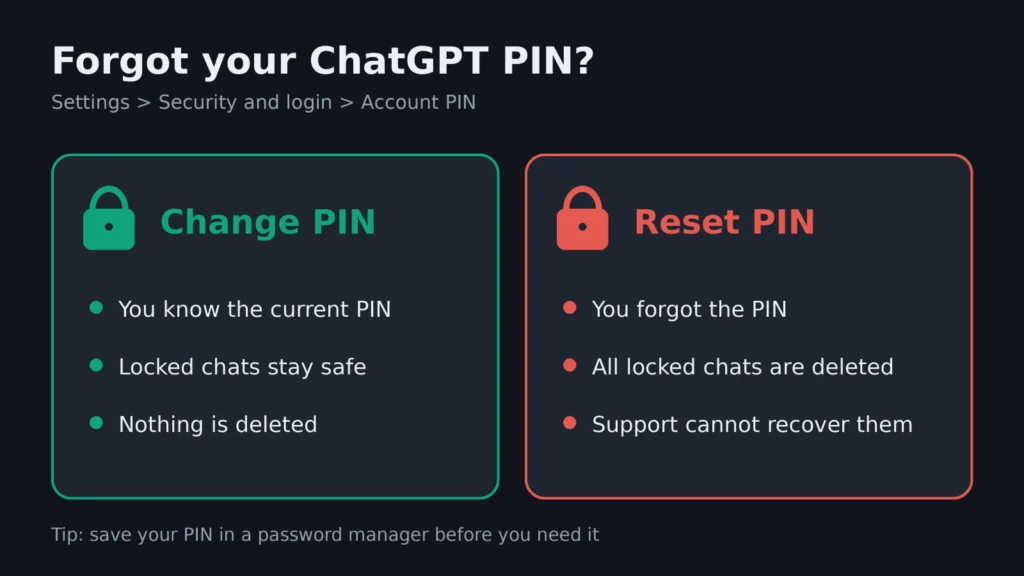
- Change your PIN (when you know the current one): go to Settings > Security and login > Account PIN and choose Change. Your locked chats stay exactly where they are.
- Reset your PIN (when you’ve forgotten it): same menu, choose Reset, verify your identity and confirm. Doing this permanently deletes every locked chat, along with any memories saved only inside those chats.
OpenAI Support can’t recover them for you, and a workspace admin can’t reset your PIN either. Simply forgetting the code doesn’t delete anything, so if you think it might come back to you, wait before you hit reset. If you use a password manager, store the PIN there, the same way you’d treat passkeys and other sign-in methods.
What locked chats do not protect
It’s easy to read “locked” and think “encrypted” or “private from OpenAI.” Neither is true, and it’s worth being clear-eyed about it.
| Question | What happens with a locked chat |
|---|---|
| Is it hidden from people using my device? | Yes, from history, pinned chats and search, until someone enters the PIN |
| Is it end-to-end encrypted? | No. It’s a lock in the app, not a sealed vault |
| Can it still be used to train models? | Yes, if “Improve the model for everyone” is switched on |
| Does it change how long OpenAI keeps the chat? | No, your normal retention settings still apply |
| Can my company see it on a work account? | Possibly. Locked chats still show up in workspace compliance logs |
| Does an old share link stop working? | No. Delete existing share links separately |
| Can someone with my PIN copy it? | Yes. Anyone who unlocks it can read and copy the text |
Tech outlet Notebookcheck made the same point when the feature arrived, noting that locked chats are not encrypted. In plain terms, this is a shield against nosy people around you, not against the company running the service. That’s similar to the gap we flagged in our breakdown of what ChatGPT’s ad pixel collects: the settings that feel private and the settings that limit data use are often two different switches.
Which chats can’t be locked?
If the Lock chat option is greyed out or missing on a particular conversation, it’s probably one of these types:
- Temporary chats
- Archived chats
- Group chats
- Chats created from someone else’s shared link
- Chats with scheduled tasks, meeting recordings or background tasks attached
- Codex conversations and local Work conversations
Locked chats also can’t be pinned, archived, moved or shared through a new link while they’re locked. You can still use voice inside a locked chat on the web and on mobile.
Locked chats vs Temporary Chat: which should you use?
These two features solve different problems, and a lot of people mix them up.
- Use a locked chat when you want to keep the conversation and come back to it later, but don’t want anyone who picks up your device to see it.
- Use Temporary Chat when you don’t want the conversation saved to your history at all. OpenAI says temporary chats aren’t used for training and are deleted from its systems within 30 days, according to its data controls FAQ.
A temporary chat can’t be turned into a locked one, so decide before you start typing. If you want both privacy from people nearby and less data used for training, lock the chat and also switch off Improve the model for everyone in Settings > Data Controls. That setting is account-wide and syncs across your devices.
Tips for using locked chats well
- Lock first, then talk. If you start a sensitive chat on a shared screen, lock it as soon as it has a first reply rather than at the end.
- Clear old share links. Locking doesn’t revoke a link you shared earlier. Go to Settings and delete it.
- Remember the project catch. Locking pulls a chat out of its project, so it loses that project’s files and instructions. Lock project chats only when hiding them matters more.
- Give other devices a moment. A locked chat’s title can linger in the list on another device until the app refreshes. Pull to refresh or reload.
- Don’t rely on it for work secrets. On a company account, assume your admin’s compliance tools can still see the content.
ChatGPT locked chats not showing? Try these fixes
Most of the time it’s just the gradual rollout, and the option will appear once your account gets it. While you wait, check these:
- Update the ChatGPT app, or try the website instead.
- On a computer, make sure you’re using the newer ChatGPT desktop app.
- Confirm the chat isn’t a temporary, archived, group or shared-link chat.
- Look under Projects > Locked chats rather than search if you think you’ve already locked it.
FAQs
Is the lock chats feature in ChatGPT free?
Yes. Locked chats are part of the Free plan as well as Go, Plus and Pro, so you don’t need to pay to use them. If you’re weighing a paid tier for other reasons, our ChatGPT Go vs Google AI Plus comparison breaks down what the cheaper plans add.
How do I hide ChatGPT chats without deleting them?
Yes, that’s exactly what locking does. The chat stays in your account but disappears from your history, pinned chats and search until you open the Locked chats area with your PIN.
Can I use Face ID instead of a PIN in ChatGPT?
You can use Face ID or Touch ID on iPhone, and your device unlock on Android, as a faster way in. You still need the 4-digit PIN, because it remains the backup and is the code used on devices without biometrics.
What happens to locked chats if I reset my ChatGPT PIN?
They’re permanently deleted, along with memories saved only inside them. Nobody, including OpenAI Support, can restore them. Changing your PIN while you still know the old one keeps everything.
Are ChatGPT locked chats encrypted?
No. They’re hidden behind a PIN inside the app, but they are not end-to-end encrypted, and your usual retention and training settings still apply.
Can I password protect ChatGPT conversations?
Not with a full password, but locked chats come close. Each locked conversation sits behind your 4-digit account PIN, and on phones you can add Face ID, Touch ID or your device unlock on top. Archiving or deleting a chat hides it too, but neither one asks for a code to open it again.
Do locked chats sync across my devices?
Your PIN works on every device where you’re signed in, and locked chats appear in the Locked chats area on all of them. Face ID, Touch ID and device unlock are set up separately on each phone.





Leave a Comment