
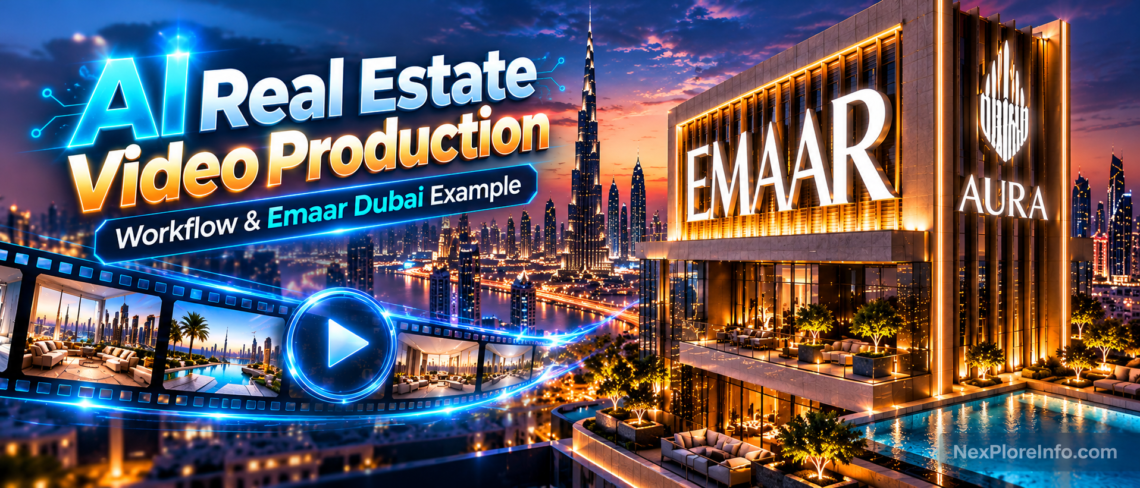
AI real estate video production uses generative AI, architectural references, editing and sometimes conventional 3D animation to create property films and concept previews. The most reliable workflow starts with accurate building references, approves keyframes before animation, and checks every shot for architectural consistency. AI can help visualize a development, but it should not invent features that buyers may mistake for confirmed property specifications.
For developers, real estate agents and creative studios in Dubai, the opportunity is clear: cinematic visual storytelling can begin before a physical building is ready to film. The challenge is making the result believable, useful and faithful to the project. This guide explains how to plan an AI property video, which production methods to combine and what to verify before publishing, using an Emaar-themed creative project as a discussion example.
What is AI real estate video production?
AI real estate video production is the process of using generative image or video models as part of making property marketing footage, architectural concepts, walkthroughs or promotional sequences. It can begin with written instructions, photographs, approved renders, illustrated keyframes or a mix of those sources.
It is not the same as a conventional 3D architectural animation. In a 3D scene, a designer controls the building geometry, materials, camera and lights. An AI video model synthesizes the appearance of the scene across frames, which can produce attractive motion but may also change details unexpectedly. That distinction is crucial when a video represents a specific property rather than a fictional concept.
Why AI-generated property videos need a different workflow
A real estate film is judged on two levels. It must create an atmosphere, and it must communicate the property accurately. A dramatic camera orbit means little if the tower loses balconies during the movement. A beautiful interior can be misleading if the floor plan, windows or amenities do not match the approved project.
Visual changes that might go unnoticed in a fantasy clip become serious in architectural marketing. Facade grids, floor counts, neighboring buildings, landscape features and branded signage all contribute to how viewers understand a development. Even when a project is unfinished, those details need a clear relationship to approved source material.
That means creative direction and technical verification should happen together. The production team needs to know which elements are flexible, such as mood, timing or some atmospheric effects, and which are fixed, such as a particular building’s design.
An Emaar-themed Dubai AI video as a creative example
An Emaar-themed real estate video featured in the AI Magic creative portfolio provides a relevant context for discussing cinematic property visualization. The example is referenced as an independently created, Emaar-themed visual project, not as evidence of an official Emaar commission or endorsement.
The useful questions are not simply whether the finished sequence looks impressive. Does the visual language establish the development’s scale? Does the camera draw attention to the architecture? Can a viewer recognize the building and surrounding environment across shots? Do lighting, materials and transitions contribute to one believable place?
Example note: This section refers to an independently created Emaar-themed visual example used to discuss workflow principles. It should not be read as evidence of an official Emaar commission or endorsement.
Step 1: Decide what the video is allowed to represent
Before writing a prompt, decide whether the output is a mood film, a conceptual visualization or a marketing asset for a real, identifiable development. The level of factual accuracy required changes with the purpose.
A concept film may use an imagined tower to explore lighting or camera language. An advertisement for a specific property should use approved renders, designs and descriptions. It should not add an infinity pool, park, private beach or skyline view that the developer has not confirmed.
Write a short production brief that identifies the audience, desired action, intended duration, delivery formats, location, required building features and approval owner. Include a separate list of visual facts that cannot change. This is a more useful starting point than asking a model to create a generic “luxury Dubai real estate video.”
Step 2: Gather architectural references that agree with each other
References give the production a consistent visual foundation. Useful material can include approved exterior perspectives, front elevations, close views of facade materials, location context, interior renders and landscaping plans. Confirm usage rights before uploading client designs or confidential material to an AI service.
Choose references deliberately. A straight-on image may establish window arrangements, while a three-quarter view can show how the building changes depth around a corner. An interior render can help define materials and furnishing language. Avoid supplying different design revisions as though they depict the same finalized building.
Reference-image controls are increasingly part of AI workflows. Runway’s current reference tools let creators guide scenes and subjects with uploaded media, while Google’s Veo 3.1 supports up to three reference images for subject consistency. These controls can improve continuity, but they do not independently verify architectural accuracy, so approved project references still need human review.
Step 3: Make an approved shot list before generating motion
Break the story into purposeful camera moments. A property film could open with location context, move toward the exterior, reveal an entrance and finish on a strong architectural composition. If the video includes interiors, treat each room or transition as a separate production decision.
For each shot, record the source reference, intended viewpoint, focal architectural feature, proposed movement and exit frame. This prevents a common problem: five visually attractive shots that do not assemble into a coherent story.
Choose a manageable duration for each generation rather than assuming a single uninterrupted camera movement is always better. A short, stable view that cuts naturally to the next shot can communicate the building more effectively than a long movement that invents geometry halfway through.
Step 4: Approve still-image keyframes first
Create a starting image for each important shot and review it before generating the video. Check whether the structure, facade rhythm, balcony shapes, materials and surroundings match the intended design. Resolve incorrect details at the image stage whenever possible.
A keyframe approval gate saves the creative team from animating an already incorrect composition. It also gives a client something concrete to approve. If a stakeholder requests a lower camera angle or a stronger focus on the entrance, those changes can be discussed before motion generation introduces additional variables.
Keep a simple version record for each approved image. The keyframe should remain available when the corresponding video is reviewed, so the team can identify which details shifted during animation.
Step 5: Write camera-direction prompts rather than vague cinematic descriptions
An effective image-to-video prompt explains what should move and what should stay stable. For an exterior tower shot, separate camera motion from architectural constraints.
Example: “The camera advances slowly toward the tower from a slightly elevated three-quarter viewpoint. Preserve the approved building silhouette, facade arrangement, balconies and surrounding structures. Keep the camera movement smooth, with natural perspective changes and consistent afternoon lighting. The building remains stationary and does not deform.”
This gives a defined action and identifies what must not change. Compare it with a vague prompt asking for an “epic luxury building reveal,” which gives little guidance about continuity. Good prompts do not need to contain every possible cinematic adjective. They need to communicate the desired behavior.
For broader prompt construction, including shot language and camera examples, see NexPloreInfo’s guide to writing AI video prompts. Use that separate tutorial for prompt fundamentals and keep this real estate workflow focused on property accuracy.
Step 6: Protect architectural consistency throughout the clip
Play the entire generated shot and watch specific areas of the building rather than only the overall movement. Check whether windows appear or disappear, balcony railings change, facade panels melt into one another, or building proportions shift when the camera turns.
Rapid or complex camera moves may demand more visual reconstruction than the available references can support. When that happens, simplify the movement, provide a better-matched viewpoint, or use a conventional 3D render for the geometry-sensitive portion.
For branded developments, also inspect signage and logos carefully. Generative models can alter lettering and graphical marks. Add exact approved branding during compositing when precise typography matters. The same principle applies to location pins, price labels, disclaimers and calls to action.
Step 7: Make interiors obey spatial logic
An AI interior walkthrough can be compelling while still being spatially impossible. A living room might gain an extra doorway, the balcony may move to the opposite wall, or the camera may seem to cross through furniture.
Before generating transitions, establish which rooms connect and where doors, windows, corridors and major furniture pieces sit. Where accuracy matters, use architectural plans or a simple 3D layout to guide transitions. If the connection cannot be represented reliably, use an intentional cut between approved compositions.
Think about motion as a physical camera operator would. The lens has a height, direction, field of view and travel path. A coherent path will often feel more premium than an unnecessarily fast flight through several unrelated rooms.
Step 8: Match lighting and color across separately generated shots
Lighting establishes emotion. Daylight can emphasize openness and materials, sunset can create warmth, and night scenes can reveal architectural illumination. But shots that belong to one moment should not randomly alternate between incompatible sun positions or color temperatures.
Decide which scenes share a time of day and keep the broad lighting direction consistent. Pay attention to the way reflective glass and stone appear as the camera moves. A material that changes dramatically between adjacent shots can make the property feel like a different building.
Color grading and compositing can help unify approved footage, but these tools cannot reliably repair every geometry error. Make the structural checks first, then refine the overall visual character.
Step 9: Combine AI video with 3D animation and conventional editing
The question is not whether AI should replace every part of the workflow. It is which technique creates the most useful and trustworthy result for a particular shot.
AI-assisted generation may help with exploratory moods, establishing images or stylized atmospheric sequences. Conventional 3D may be more suitable for exact facade geometry, measured camera trajectories or approved interior layouts. Editing and compositing can deliver reliable typography, brand elements and smooth transitions.
This hybrid approach matters for developers and agencies because revisions are part of the job. If a client changes an exterior material or wants the camera to hold longer on an entrance, an editable 3D scene may offer a clearer revision path than generating an entirely new sequence.
Step 10: Build a quality-control checklist for delivery
Review the final sequence in separate passes. In the first pass, check property-specific facts: architectural shape, visible amenities, location context, branding and project descriptions. In the second, review motion: camera paths, transitions, perspective, physical plausibility and unwanted distortions. In the third, inspect delivery quality: text readability, music rights, audio levels, framing, color and export formats.
Assign defects by severity. An incorrect architectural feature is a serious factual issue. A small background flicker might be a visual issue that can be repaired or accepted depending on its prominence. Keeping these categories separate helps teams make proportionate decisions about revisions.
Do not publish a video just because its thumbnail looks convincing. Architecture must remain coherent over time, and the final edit should be checked at the size and aspect ratio the audience will actually see.
How much does AI real estate video production cost?
There is no reliable universal price for an AI property video. The final cost depends on the model, number of generated attempts, length of footage, reference preparation, editing, revisions and any supporting 3D or compositing work. A short final video can still require considerable work behind the scenes.
Calculate the production cost as generation charges + reference preparation + editing labor + revision labor + any 3D or finishing costs. Keep rejected generations in the calculation rather than counting only the footage that reached the final timeline.
For a comparable internal metric, divide the number of accepted clips by the number of generated clips and multiply by 100. This acceptance rate is not a universal quality score, but it can help a team compare workflows with similar briefs and approval standards.
A lower cost per generated second is not necessarily a lower cost per finished, approved second. That distinction is particularly important when the work includes precise architectural requirements.
Can AI-generated property videos be used for real estate marketing?
Yes, AI-assisted property videos can support marketing when the visuals are accurate, appropriately authorized and clearly presented. The production should not imply that fictional amenities, finishes or surrounding views are confirmed project facts.
For an unfinished development, source approval is essential. Establish whether a visualization is illustrative, and use clear disclosures where necessary to avoid misleading viewers. Developers and agencies should review applicable local advertising requirements and intellectual-property permissions before releasing a branded campaign.
Common questions about AI architectural videos
Can AI make a realistic building walkthrough from one image?
It can generate a moving interpretation of an image, but a single perspective does not establish the full building geometry or floor plan. For accurate walkthroughs, additional references or controlled 3D assets are preferable.
What is the difference between AI video and architectural rendering?
Architectural rendering usually visualizes a defined 3D design. Generative AI video creates frames based on supplied inputs and learned patterns, which can introduce details that were never specified. Many effective workflows combine both methods.
How do you keep the same building across AI video shots?
Use approved references, consistent shot specifications, reviewed keyframes and modest camera movement. Inspect each clip for geometry changes and keep exact architectural elements in 3D or compositing when needed.
Is an AI-generated Emaar-themed video an official Emaar advertisement?
Not necessarily. A creator’s Emaar-themed portfolio project should not be presented as officially commissioned, endorsed or approved unless that relationship can be verified.
The bottom line
AI is widening the creative options for real estate video production, especially when teams need to explore cinematic concepts before a property can be filmed. But architectural accuracy, continuity and responsible presentation remain essential.
Start with a clear purpose and approved references. Establish the shots, approve the still frames, direct one camera movement at a time and inspect the entire generated result. Use conventional 3D and compositing when precision matters more than visual experimentation.
That is how AI moves from making an attractive property clip to supporting a dependable real estate production workflow.












Leave a Comment