

The best budget wireless mouse for work has three jobs: stay comfortable through an eight-hour day, never drop its connection in the middle of a spreadsheet, and keep quiet in a shared office. In October 2026, Logitech sells several work-ready wireless mice between $17.99 and $49.99 in the USA, and the same models are widely stocked in the UAE.
Searching for the best wireless mouse for work in 2026 without overspending? This buying guide compares six models already on sale, using official specs and prices from the manufacturer’s own USA store.
Quick Summary
- Best overall: Logitech Signature M650, $39.99 | AED 147 (silent clicks, SmartWheel, three sizes)
- Best silent pick under $30: Logitech M240 Silent, $22.99 | AED 84 (Bluetooth, 18-month battery)
- Cheapest: Logitech M185, $17.99 | AED 66 (plug-in USB receiver, 12-month battery)
- Best for multiple devices: Logitech M720 Triathlon, $44.99 | AED 165 (pairs with three devices)
- Best for laptops and work from home: Logitech Pebble Mouse 2 M350s, $24.99 | AED 92 (slim, silent, three devices)
- Best ergonomic option: Logitech ERGO M575S trackball, $49.99 | AED 184 (thumb-controlled, less arm movement)
USA figures below use Logitech’s regular/list prices checked October 11, 2026. Temporary sales can be lower; for example, Logitech currently lists the M240 Silent at $18.99 versus its $22.99 regular price. AED figures are approximate conversions at 3.6725 AED per USD for reference, while actual UAE retailer prices can differ.
Best Budget Wireless Mouse for Work: Quick Comparison
| Model | Best for | Connection | Claimed battery | Devices | USA price | UAE price (approx.) |
|---|---|---|---|---|---|---|
| Signature M650 | Best overall | Logi Bolt receiver or Bluetooth | Up to 24 months | 1 | $39.99 | AED 147 |
| M240 Silent | Quiet offices | Bluetooth | Up to 18 months | 1 | $22.99 | AED 84 |
| M185 | Lowest price | USB nano receiver | Up to 12 months | 1 | $17.99 | AED 66 |
| M720 Triathlon | Multi-device desks | Unifying receiver or Bluetooth | Up to 24 months | 3 | $44.99 | AED 165 |
| Pebble Mouse 2 M350s | Laptops and travel | Bluetooth | Long life on one AA | 3 | $24.99 | AED 92 |
| ERGO M575S | Wrist and arm comfort | Logi Bolt receiver or Bluetooth | Long life on one AA | 1 | $49.99 | AED 184 |
How We Chose These Budget Office Mice
This guide uses verified manufacturer specifications, regular USA pricing and current retail availability. We included mice priced at $50 or less at regular/list price that support common work platforms such as Windows and macOS. Battery-life figures are manufacturer estimates and can vary with connection type, usage and settings.
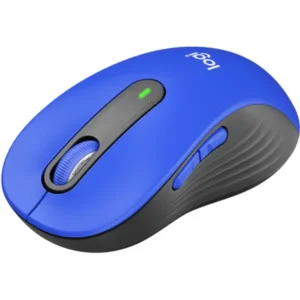
Logitech Signature M650
1. Logitech Signature M650: Best Budget Wireless Mouse for Work Overall
Price: $39.99 | AED 147
The Signature M650 is the easiest recommendation for most office workers because it fixes the small annoyances cheaper mice ignore. Its SmartWheel scrolls line by line for precise editing, then switches to fast free-spin with a flick. The clicks are quiet, and the two side buttons can be customized in Logi Options+ on Windows and macOS.
Fit is its biggest advantage. Logitech sells it in three versions: the standard M650 for small to medium hands, the M650 L for large hands, and the M650 L Left for left-handed users.
Key specs: Logitech Advanced Optical Tracking, one AA battery included, up to 24 months of battery life with the Logi Bolt USB receiver or up to 20 months over Bluetooth, and support for Windows, macOS, Linux, iPadOS and Android. It is also Works With Chromebook certified. The standard model weighs 101.4 g.
Who it is for: Anyone who spends most of the day in documents, spreadsheets and browsers and wants a comfortable, quiet mouse without paying premium prices.
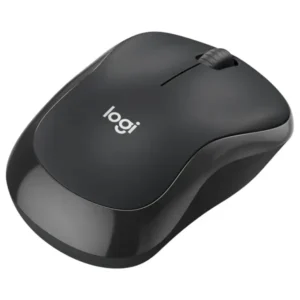
Logitech M240 Silent
2. Logitech M240 Silent: Best Silent Wireless Mouse for Office on a Budget
Regular price: $22.99 | AED 84 approximate Current Logitech sale: $18.99
If click noise is your main concern, the M240 Silent is the value pick. Logitech says its SilentTouch technology cuts clicking sound by 90% while keeping the familiar click feel. That suits open-plan offices and shared home desks.
It connects only over Bluetooth, so there is no dongle to lose. The contoured, compact body works for both left and right hands.
Key specs: Bluetooth pairing, up to 18 months of battery life on one pre-installed AA battery with auto-sleep, and support for Windows, macOS, ChromeOS, Linux and Android. In the UAE, Carrefour UAE has listed the Graphite model at AED 91.
Who it is for: Budget buyers who want a quiet mouse and a laptop with working Bluetooth. If your desktop PC has no Bluetooth, pick the M185 or Signature M650 instead.
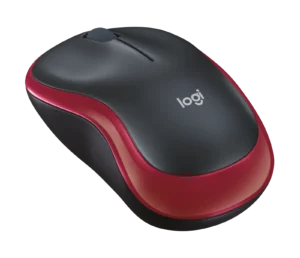
Logitech M185
3. Logitech M185: Best Cheap Wireless Mouse for Office Under $20
Price: $17.99 | AED 66
The M185 is the simplest, cheapest way to get a reliable work mouse. Plug the tiny USB receiver into your computer and it works right away, with no pairing and no software.
Logitech says the receiver holds a strong connection up to 10 meters away, and the on/off switch plus auto-sleep stretches one AA battery up to 12 months. The small shape is ambidextrous and easy to carry with a laptop, making it a straightforward option for basic office work or as a spare mouse.
Key specs: 2.4 GHz wireless with USB nano receiver, line-by-line scroll wheel, up to 12 months of battery life, and support for Windows, macOS, ChromeOS and Linux.
Who it is for: Students and anyone who needs a dependable spare mouse for the lowest price. It lacks silent clicks.
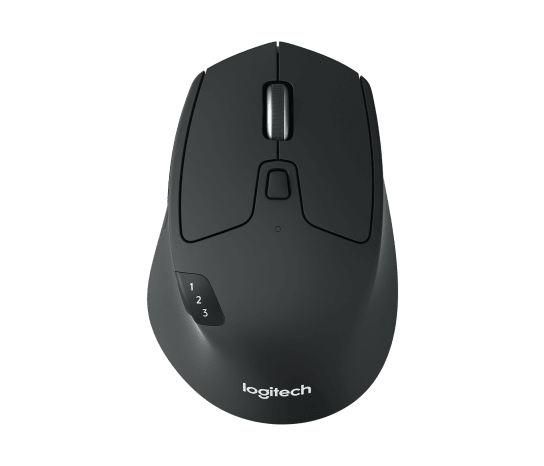
4. Logitech M720 Triathlon: Best Wireless Mouse for Multiple Devices
Price: $44.99 | AED 165
The M720 Triathlon is built for people who work across more than one computer. It pairs with up to three devices, and a button under your thumb switches between them instantly. With Logitech Flow, you can even move the cursor across two computers and copy and paste text and files between them.
It is also the most feature-packed pick, with a full-size, right-handed shape with a rubber grip, two side buttons plus a hidden thumb button, a hyper-fast scroll mode for long pages, and a tilt wheel for sideways scrolling in wide spreadsheets. Logitech first listed it at $69.99 when it launched in 2016, so today’s $44.99 price makes it a strong value.
Key specs: Bluetooth or Logitech Unifying USB receiver, up to 24 months of battery life on one AA battery, adjustable tracking speed, and support for Windows, macOS, ChromeOS, Linux and iPadOS.
Who it is for: Office workers who switch between a company laptop, a personal PC and a tablet every day. Left-handed users should look at the Signature M650 L Left instead.
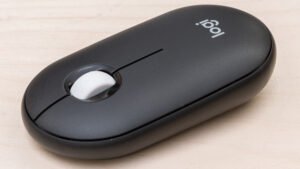
Logitech Pebble Mouse 2 M350s
5. Logitech Pebble Mouse 2 M350s: Best Wireless Mouse for Laptop and Work From Home
Price: $24.99 | AED 92
The Pebble Mouse 2 M350s is a slim, rounded mouse that slips into any bag, which makes it ideal for hybrid workers who move between home, the office and a cafe. It pairs with three devices through an Easy-Switch button, just like the M720.
Logitech says its Silent Touch technology removes 90% of click noise, and the middle button can be customized. Its colors use more than 50% recycled plastic. Retail spec sheets list up to 24 months of battery life on one AA battery, and it can also use a Logi Bolt receiver, which is sold separately.
Key specs: Bluetooth, three-device Easy-Switch, silent clicks, customizable middle button, and support for Windows, macOS, iPadOS and Android.
Who it is for: Laptop users and remote workers who want a quiet, portable mouse for under $30. The flat shape gives less palm support than the Signature M650, so it suits shorter sessions better than all-day desk use.
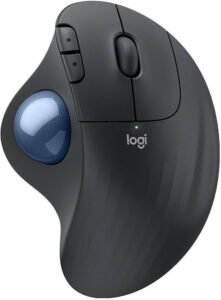
Logitech ERGO M575S
6. Logitech ERGO M575S: Best Ergonomic Wireless Mouse on a Budget
Price: $49.99 | AED 184 (Logitech has run sales as low as $39.99)
A trackball takes a day or two to learn. With the ERGO M575S, your hand stays still and your thumb moves the ball, so your arm does not travel across the desk. Logitech says the sculpted design reduces forearm muscle strain by 25%.
The “S” version adds quieter clicks, which Logitech rates as 80% quieter than the original M575. It also works on any surface and needs little desk space.
Key specs: Thumb-operated trackball, three customizable buttons (back, forward and middle click), adjustable cursor speed in Logi Options+, Logi Bolt receiver or Bluetooth connection, and a single AA battery.
Who it is for: People who feel wrist or forearm discomfort after long days, or anyone working at a small or crowded desk.
Best Wireless Mouse Under $30 vs Under $50: Which Budget Fits You?
Under $30 gets you the M185, M240 Silent and Pebble Mouse 2 M350s. They handle email, browsing and documents well. The trade-off is fewer buttons and a smaller shape that may feel cramped for large hands during full-day use.
Between $30 and $50 gets you the Signature M650, M720 Triathlon and ERGO M575S. The extra money buys better comfort, more buttons and faster scrolling. If you work at a desk for six or more hours a day, this is where the best value sits.
What to Look For in a Budget Wireless Mouse for Productivity
- Connection type: A USB receiver is the most plug-and-play option for desktops. Bluetooth frees up a USB port, which matters on thin laptops with only USB-C ports.
- Battery life: All six picks run on a single AA battery and last a year or more, according to Logitech.
- Click noise: In shared offices, silent clicks are worth paying for. The Signature M650, M240 Silent, Pebble Mouse 2 and ERGO M575S all reduce click noise.
- Hand size and shape: A mouse that is too small causes you to grip harder. Large hands should look at the M650 L or M720. Left-handed users should choose the M650 L Left or an ambidextrous model.
- Multi-device support: If you use a work laptop and a personal PC, a three-device mouse like the M720 or Pebble Mouse 2 saves you from buying two.
- DPI: Do not overpay for high DPI numbers. For normal office work, a standard optical sensor is more than enough.
To tidy your desktop too, see our guide on how to move the taskbar in Windows 11.
Where to Buy in the USA and UAE
In the USA, all six mice are sold directly on Logitech’s official store, and they are also stocked at Amazon, Best Buy, Walmart and Target. In the UAE, look for them at Amazon.ae, noon, Sharaf DG and Carrefour UAE. Choose listings that ship from within the UAE with a local warranty.
Shopping for a new work laptop at the same time? Our guide to the best gaming laptops under $1,000 covers machines that handle both office work and gaming, and our full best gaming laptops 2026 guide covers higher budgets. Play games too? See our guide to the best budget gaming mouse.
Frequently Asked Questions
What is the best budget wireless mouse for work in 2026?
The Logitech Signature M650 is the best all-round pick at $39.99 | AED 147. It offers silent clicks, a smart scroll wheel, up to 24 months of battery life and three sizes, including a left-handed version.
What is the best wireless mouse under $30 for office work?
The Logitech M240 Silent has a $22.99 regular price and is currently listed by Logitech at $18.99. It is a strong choice under $30 if you want quiet clicks and Bluetooth. If you need multi-device support, the Pebble Mouse 2 M350s at $24.99 | AED 92 pairs with three devices.
Is a Bluetooth mouse or a USB receiver mouse better for work?
A USB receiver mouse like the M185 is the simplest for desktops and computers without Bluetooth. A Bluetooth mouse like the M240 Silent is better for laptops because it does not use a USB port. The Signature M650 and ERGO M575S support both.
Which budget wireless mouse is best for multiple devices?
The Logitech M720 Triathlon at $44.99 | AED 165 pairs with up to three devices and supports Logitech Flow for moving files between computers. The Pebble Mouse 2 M350s is a cheaper three-device option.
What is the quietest cheap wireless mouse for the office?
The Logitech M240 Silent and Pebble Mouse 2 M350s both use Logitech’s silent click technology, which the company says removes 90% of click noise.
Is an ergonomic mouse worth it on a budget?
If you feel wrist or forearm strain after long days, yes. The ERGO M575S trackball costs $49.99 | AED 184 and lets your arm stay still while your thumb moves the cursor. Allow a day or two to get used to it.
Final Verdict
For most people, the Logitech Signature M650 is the best budget wireless mouse for work, balancing comfort, quiet clicks and long battery life for $39.99 | AED 147. On a tighter budget, the M240 Silent ($22.99 | AED 84) and M185 ($17.99 | AED 66) cover the basics, while the M720 Triathlon suits multi-computer setups and the ERGO M575S puts comfort first.












Leave a Comment