
Google’s Gemini 4 Argon is the most capable model in the Gemini lineup, and it is now open to paying users instead of a small group of security partners. The tricky part is that Argon does not show up in the same place for everyone. Your Google AI plan decides whether you can use it in the Gemini app, in AI Mode in Search, in Google AI Studio or in Google Antigravity.
This guide is for everyday users, creators and developers in the USA and UAE. You will learn what Argon is, which plan includes it, what it costs in USD and AED, and how to use it step by step, plus tips, common mistakes and alternatives.
How do you use Gemini 4 Argon?
To use Gemini 4 Argon, you need a paid Google AI Pro or Google AI Ultra plan. Open the Gemini app or AI Mode in Google Search, then choose Argon from the model options. Developers can call it through the paid Gemini API with the model ID gemini-4-argon. Free Gemini accounts and the free API tier do not include Argon.
What Is Gemini 4 Argon?
Gemini 4 Argon is the first model in Google’s Gemini 4 family. Google describes it as a frontier model built for deep work: complex coding, finance, legal research, cybersecurity defense and science. In simple terms, it is the model you pick when a task has many steps and needs careful reasoning, not a quick one-line reply.
Three things make Argon different from the Gemini models most people already know:
- Very long answers. Through the API, Argon can produce up to 1 million tokens in one response using a feature Google calls long decode. Earlier Gemini models stopped at about 64,000 output tokens.
- Stronger multi-step reasoning. Google says Argon is better at staying on track across long workflows, like refactoring a large codebase or comparing dozens of documents.
- Multimodal input. Argon can read text, images, video, audio and PDFs, then answer in text.
A token is a small chunk of text, roughly three quarters of a word. See our guide to context windows and tokens explained for beginners.
Gemini 4 Argon at a Glance
| Spec | Gemini 4 Argon |
|---|---|
| Made by | Google DeepMind |
| API model ID | gemini-4-argon |
| Inputs | Text, image, video, audio, PDF |
| Output | Text only (no image or audio generation) |
| Context window | 1,048,576 tokens (shared by input, thinking and output) |
| Default max output (API) | 65,536 tokens, up to about 1M with long decode |
| Thinking levels (API) | Low, Medium, High |
| Where to use it | Gemini app, AI Mode in Search, AI Studio, Gemini API, Antigravity, Gemini for business |
Specs come from the official Gemini API model page for Gemini 4 Argon. Specs checked: October 2026.
Which Google AI Plans Include Gemini 4 Argon?
This is the question most people search first, and the answer depends on where you want to use Argon. According to Google’s official Gemini subscriptions page, Argon is included in Google AI Pro and Google AI Ultra. It is not part of the Free plan or Google AI Plus.
Pricing checked: October 2026. AED figures are approximate conversions from the USD list price. In the UAE, your final charge can depend on your Google Play or Google One billing currency, so confirm the price on the checkout screen.
| Plan | Price per month (USD | AED) | Argon in Gemini app and AI Mode | Argon in Antigravity |
|---|---|---|---|
| Free | $0 | AED 0 | No | No |
| Google AI Plus | $4.99 | AED 18 (approx.) | No | No |
| Google AI Pro | $19.99 | AED 73 (approx.) | Yes | No |
| Google AI Ultra (5x) | $99.99 | AED 367 (approx.) | Yes, higher limits | Yes |
| Google AI Ultra (20x) | $199.99 | AED 734 (approx.) | Yes, highest limits | Yes, highest limits |
One detail catches many Pro subscribers. Google’s API pricing page states that Argon is not available on the free API tier or through the Google AI Pro plan inside AI Studio. So with Pro you get Argon in the Gemini app and AI Mode, but to use it in AI Studio you need a paid API key or an Ultra plan.
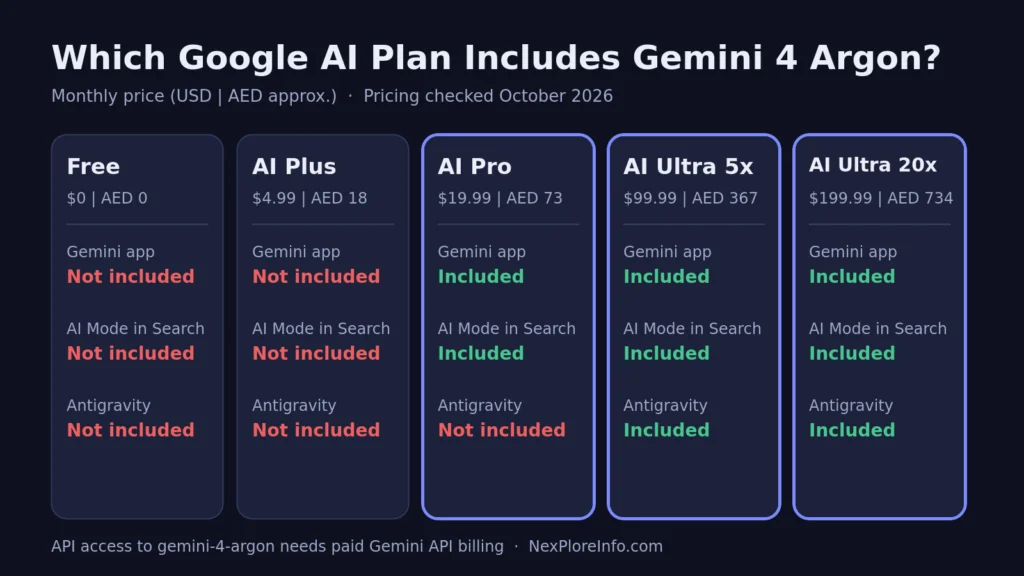
Gemini 4 Argon is included in Google AI Pro and Ultra. Prices in USD | AED (approx.), checked October 2026.
How to Use Gemini 4 Argon in the Gemini App
The Gemini app is the easiest place to start, on the web at gemini.google.com, Android, iPhone or desktop.
Step 1: Check or upgrade your plan
Open Gemini, tap your profile picture and go to your subscription settings. If you are on Free or AI Plus, upgrade to Google AI Pro or Google AI Ultra. Google AI plans are only for users aged 18 and over, and you need a personal Google account you manage yourself.
Step 2: Update the app
Older app versions may not show the newest models. Update Gemini from the Google Play Store or App Store, or refresh the web page.
Step 3: Open the model picker and choose Argon
Start a fresh chat and tap the model name at the top of the chat or near the prompt box. Select Gemini 4 Argon from the list. The exact label and position can change between app versions, so look for the Argon name rather than a fixed button.
Step 4: Pick a thinking level
Where the app shows effort or thinking options, choose Low, Medium or High. Higher levels give Argon more time to reason, but they also use more of your plan’s usage limit. Start with Medium for everyday work and switch to High for hard problems.
Step 5: Give Argon a real task with context
Upload the files Argon needs, such as PDFs, spreadsheets, screenshots or a video, then describe the outcome you want. Argon is strongest on deep tasks, so a vague one-line question will not show what it can do.
How to Use Gemini 4 Argon in AI Mode in Google Search
Pro and Ultra subscribers also get Argon in AI Mode in Search, useful when a question needs live web results plus strong reasoning.
- Sign in to Google with the same account that holds your Pro or Ultra plan.
- Open Google Search and switch to AI Mode.
- Ask a detailed, multi-part question. AI Mode uses Argon for the deeper reasoning while pulling in current search results.
- Open the cited links to check key facts before acting on them.
How to Use Gemini 4 Argon in Google AI Studio and the API
Developers and power users can work with Argon directly in Google AI Studio or the Gemini API, with full control over thinking levels, long outputs and tools.
- Turn on billing. Create or open a Google AI Studio project and attach a paid billing account. Argon is not on the free tier.
- Create an API key. Generate a key in AI Studio and store it safely, never inside public code.
- Select the model. In AI Studio, choose Gemini 4 Argon. In code, set the model to
gemini-4-argon. - Set the thinking level. Choose low, medium or high. Medium is a sensible default for testing.
- Enable long decode only when needed. Answers longer than about 64K tokens need Google’s long decode setup, which can raise cost and wait time.
Through the API, Argon supports function calling, structured outputs, code execution, Google Search grounding, URL context and file search. It does not support image generation, audio generation or the Live API. For full API pricing tiers, benchmarks and the long-decode details, read our deeper Gemini 4 Argon API pricing and access guide.
Gemini 4 Argon API Pricing
Google set an introductory price, then a higher standard price. Pricing checked: October 2026.
| Period | Input per 1M tokens (USD | AED) | Output per 1M tokens (USD | AED) |
|---|---|---|
| Introductory, until November 30, 2026 | $2 | AED 7.35 | $10 | AED 36.73 |
| Standard, from December 1, 2026 | $4 | AED 14.69 | $20 | AED 73.45 |
Cached input tokens cost 95% less than the normal input rate, and output billing includes thinking tokens. Check Google’s official Gemini API pricing page for Batch, Flex and Priority rates.
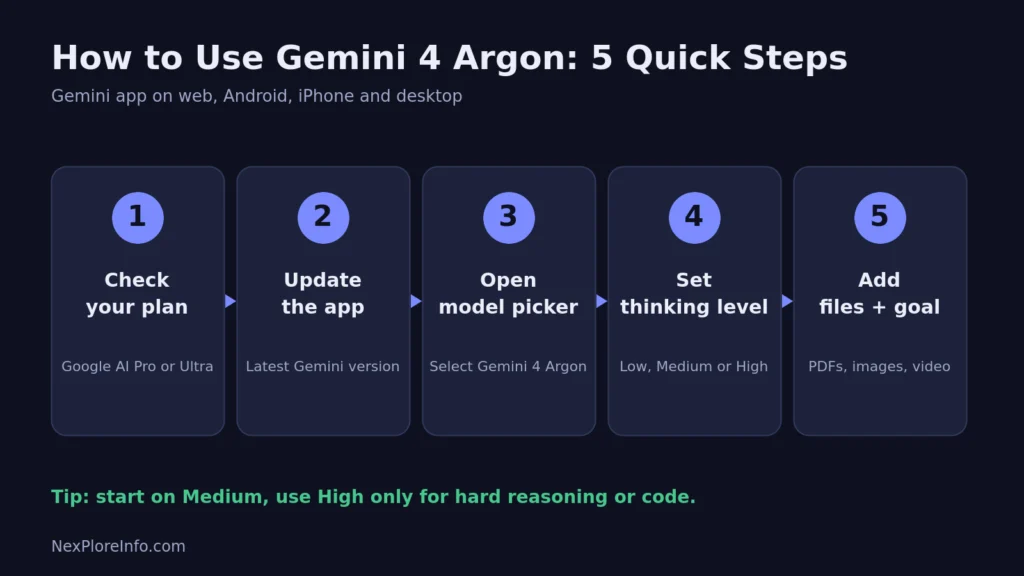
Five quick steps to start using Gemini 4 Argon in the Gemini app.
What Gemini 4 Argon Is Best At
Argon shines when the work is long, detailed and easy to get wrong:
- Large coding jobs. Debugging, refactoring and moving code between languages. Google says Argon scored 77.9% on the DeepSWE v1.1 software engineering benchmark in its own testing. See our roundup of the best AI coding tools for how it fits next to Copilot, Cursor and Claude Code.
- Document-heavy research. Comparing contracts, reports and financial filings. Google says Argon ranks first on the Vals Index, which tests finance, legal, tax and coding tasks.
- Video and chart understanding. Pulling details from long videos, charts and mixed media.
- Agent workflows. Multi-step tasks where the model plans, uses tools and checks its own work. If agents are new to you, start with our explainer on what an AI agent is.
- Long-form writing. Google says Argon follows style instructions better than earlier Gemini models, hedges less and repeats itself less.
For quick questions, Gemini Flash is usually enough and saves your Argon limits.
Tips for Better Results With Gemini 4 Argon
- State the goal and the finish line. Tell Argon what a good result looks like, for example “a 10-slide outline with one data point per slide.”
- Give it the source material. Upload the files instead of describing them. Argon works best when it can read the real evidence.
- Match the thinking level to the job. Use Low for simple rewrites, Medium for most work and High for tough reasoning or code.
- Ask it to show sources. When facts matter, request citations or page references so you can verify quickly.
Common Mistakes to Avoid
- Asking it for images. Argon answers in text only. Use Nano Banana in Gemini for images and Veo for video.
- Using High thinking for everything. It burns through usage limits faster on Pro, and costs more on the API.
- Assuming Pro covers AI Studio. Pro gives you Argon in the Gemini app and AI Mode only. AI Studio needs paid API access or Ultra.
- Skipping fact checks. A stronger model still makes mistakes. Our guide to AI hallucinations and how to spot them explains why.
- Sharing sensitive data carelessly. Consumer Gemini chats follow Google’s consumer privacy settings. Business data belongs in Gemini for business, which Google says is not used to train its models.
Free vs Paid: Gemini 4 Argon Limits Explained
There is no free way to use Argon. In the Gemini app, Google uses compute-based limits that refresh every five hours until you reach a weekly cap. Bigger prompts, longer chats and higher thinking levels use more of that allowance. Google AI Pro gives 4x the Free plan’s usage, Ultra (5x) gives five times Pro, and Ultra (20x) gives twenty times Pro. If you run out, you can wait for the reset or buy extra AI credits where Google offers them.
Gemini 4 Argon Alternatives
| Model | Best for | Why consider it |
|---|---|---|
| Gemini 3.8 Flash | Fast everyday tasks | Cheaper and faster, included in lower Google plans |
| GPT-6 Astra (OpenAI) | Complex reasoning and coding | Strong rival frontier model inside ChatGPT |
| Claude Opus 5.5 (Anthropic) | Writing, coding and agent work | Popular with developers and long-document users |
Read our guides to GPT-6 Astra price and features and Claude AI explained to compare before you pay for another subscription.
Frequently Asked Questions
Is Gemini 4 Argon free to use?
No. Argon needs a Google AI Pro or Google AI Ultra plan in the Gemini app and AI Mode, or paid billing on the Gemini API. The Free plan, Google AI Plus and the free API tier do not include it.
Can I use Gemini 4 Argon with Google AI Pro?
Yes. Google AI Pro at $19.99 | AED 73 (approx.) per month includes Argon in the Gemini app and AI Mode in Search. It does not include Argon in Google Antigravity or AI Studio, which need Ultra or paid API access.
How much does Gemini 4 Argon cost in the USA and UAE?
The cheapest route is Google AI Pro at $19.99 | AED 73 (approx.) per month. Developers pay per token on the API: $2 | AED 7.35 per million input tokens and $10 | AED 36.73 per million output tokens until November 30, 2026, then $4 | AED 14.69 and $20 | AED 73.45.
Can Gemini 4 Argon create images or videos?
No. Argon reads images, video, audio and PDFs, but it only writes text. In the Gemini app you can still use Google’s separate image and video tools alongside it.
Is Gemini 4 Argon better than GPT-6 Astra?
Google reports Argon ahead on many of the benchmarks it published, but those are the company’s own picks. Results depend on the task, so test both on your real work before switching. TechCrunch’s coverage notes the comparisons came from Google’s own blog.
Gemini 4 Argon is a big step up for deep, multi-step work. Pick the plan that matches where you work, keep Flash for quick chats, and save Argon for projects where depth matters most. For more practical AI guides, keep exploring NexPloreInfo.com.












Leave a Comment