
Quick answer: To connect to Xfinity WiFi, open your device’s WiFi settings, pick xfinitywifi, then sign in with your Xfinity ID on the login page that opens in your browser. Xfinity Internet and Xfinity Mobile customers use the hotspots at no extra charge, and everyone else can buy a 30-day NOW WiFi Pass where it’s offered.
This guide shows how to connect to Xfinity WiFi on iPhone, Android, Windows and Mac. You’ll also see when the secure XFINITY and Xfinity Mobile networks are worth using instead, plus what to do if the login page doesn’t appear and how non-customers can use the NOW WiFi Pass.

In this article 19 sections
- How to Connect to Xfinity WiFi: Quick Steps
- What Is Xfinity WiFi?
- How to Find an Xfinity WiFi Hotspot Near You
- How to Connect to Xfinity WiFi on iPhone
- How to Connect to Xfinity WiFi on Android
- How to Connect to Xfinity WiFi on Windows 11
- How to Connect to Xfinity WiFi on Windows 10
- How to Connect to Xfinity WiFi on Mac
- How to Connect to a Secure Xfinity Hotspot
- How to Use an Xfinity WiFi Hotspot Away From Home
- Xfinity WiFi Login Page Not Showing? Try These Fixes
- Xfinity WiFi Connected but No Internet
- Why Can’t I Connect to Xfinity WiFi?
- Is xfinitywifi Free?
- Is xfinitywifi Secure?
- Xfinity WiFi vs Xfinity Home WiFi
- How to Stop Automatically Connecting to xfinitywifi
- Final Tips
- FAQs
How to Connect to Xfinity WiFi: Quick Steps
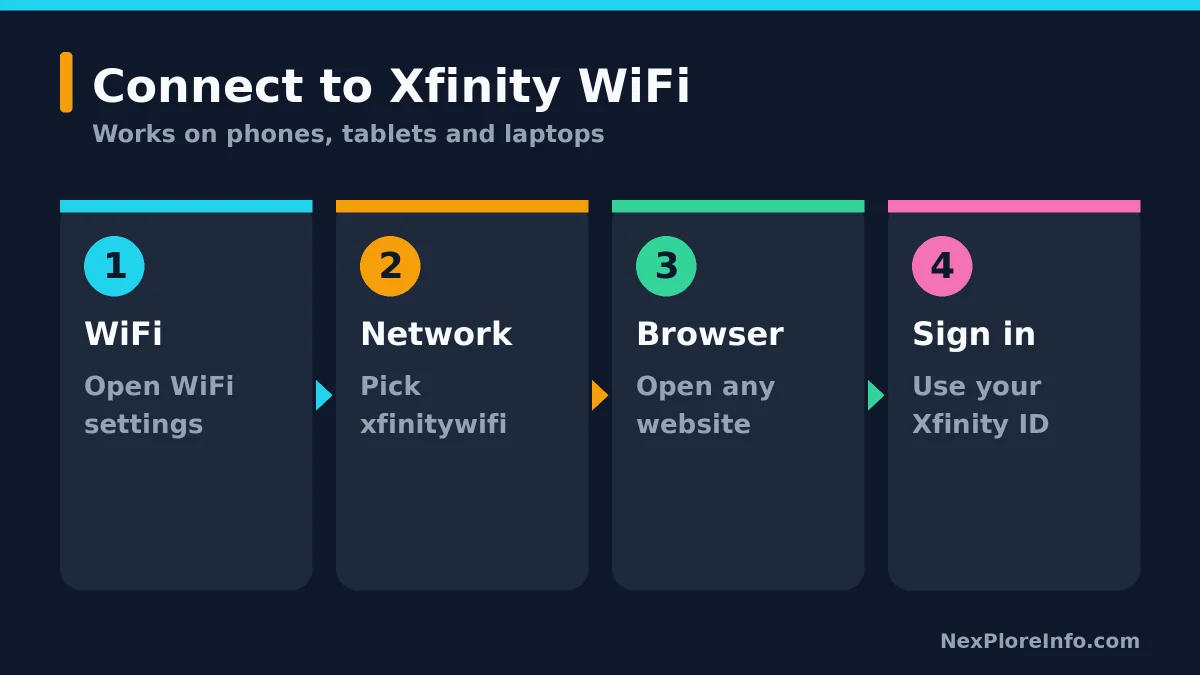
- Open WiFi settings on your phone, tablet or computer.
- Look for the network named xfinitywifi.
- Select it and wait for your device to connect.
- Open a web browser if the Xfinity sign-in page does not open automatically.
- Visit a normal website such as xfinity.com to trigger the hotspot login page.
- Sign in with your Xfinity ID and password if requested.
Here’s where to find each setting by device:
| Device | Where to find WiFi | Network to pick | Secure hotspot option |
|---|---|---|---|
| iPhone | Settings, then Wi-Fi | xfinitywifi | Automatic for Xfinity Mobile customers |
| Android 11 or newer | Settings, then Network & Internet or Connections | xfinitywifi or XFINITY | Secure Auto-Connect in the Xfinity app |
| Android 10 or older | Settings, then Wi-Fi | xfinitywifi | Xfinity Mobile network, manual sign-in, for Xfinity Mobile customers |
| Windows 11 and 10 | Network icon on the taskbar | xfinitywifi | Sign in through the browser page |
| Mac | Wi-Fi in the menu bar or System Settings | xfinitywifi | Sign in through the browser page |
Xfinity says its public hotspot network is available within its service territory and eligible Xfinity customers can use the hotspots at no extra charge. Non-customers may also be able to buy a NOW WiFi Pass in supported areas.
What Is Xfinity WiFi?
Xfinity WiFi is Comcast’s public hotspot network. It is separate from your private home WiFi network.
You may see three common network names:
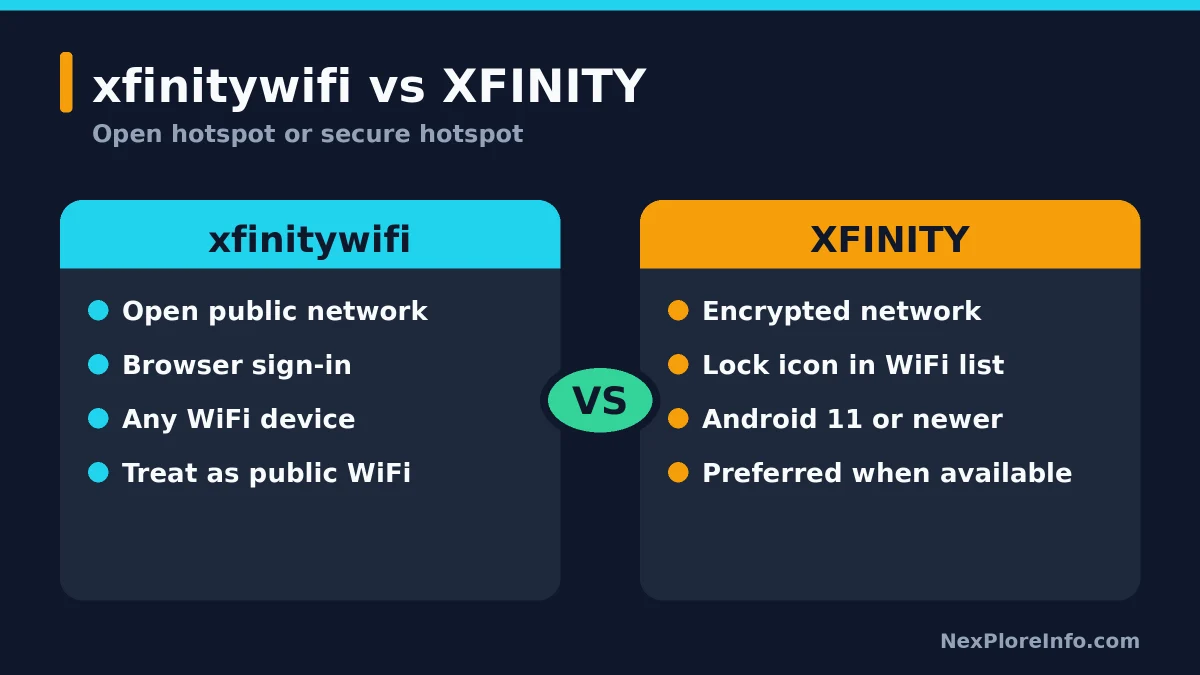
- xfinitywifi: the open public hotspot network.
- XFINITY: a secure Xfinity hotspot network on supported devices.
- Xfinity Mobile: another secure network used by compatible Xfinity Mobile devices.
Xfinity recommends secure hotspots when your device supports them. The open xfinitywifi network is convenient, but Xfinity describes it as an unsecure hotspot, so it should be treated like public WiFi at a hotel, airport or coffee shop.
How to Find an Xfinity WiFi Hotspot Near You
Xfinity provides a hotspot map that lets you search for nearby locations. You can also simply open your device’s WiFi settings and check whether xfinitywifi, XFINITY or Xfinity Mobile appears in the available network list.
If you are not an Xfinity customer, Xfinity currently offers NOW WiFi Pass in supported areas. As of October 25, 2026, Xfinity advertises a 30-day pass for $10 with no contract, unlimited data, access to millions of hotspots and up to two devices at a time. Availability and pricing can change, so verify the current offer on Xfinity’s website before purchasing.
How to Connect to Xfinity WiFi on iPhone
On an iPhone, you join xfinitywifi from Settings and then sign in through Safari. It takes under a minute.
- Open Settings.
- Tap Wi-Fi.
- Make sure WiFi is turned on.
- Select xfinitywifi.
- Wait for the phone to connect.
- If the login page does not appear, open Safari and visit xfinity.com.
- Sign in with your Xfinity ID if prompted.
Secure hotspot access on iPhone depends on your account. Xfinity says Xfinity Mobile connects you to the secure networks automatically. If you don’t see XFINITY or Xfinity Mobile in your list, the open xfinitywifi network with browser sign-in still works, and the Xfinity app shows what your account supports.
How to Connect to Xfinity WiFi on Android
All supported Android devices can connect to the open xfinitywifi hotspot when it is available.
- Open Settings.
- Open Network & Internet, Connections or Wi-Fi.
- Turn WiFi on.
- Select xfinitywifi.
- Open your browser if the login page does not appear.
- Sign in with your Xfinity ID and password.
Secure Xfinity WiFi on Android 11 and newer
Xfinity says Android 11 and newer devices can use secure Xfinity WiFi hotspots when the account and device are eligible. Xfinity Internet customers can use the Xfinity app to configure Secure Auto-Connect:
- Sign in to the Xfinity app.
- Open the WiFi tab.
- Select WiFi hotspots.
- Select Connect automatically.
- Tap Auto-connect now and follow the prompts.
On Android 10 and older, only Xfinity Mobile customers can join the secure Xfinity Mobile network, by selecting it manually and signing in through the pop-up. Everyone else on older Android versions uses the open xfinitywifi network.
The NOW WiFi Pass costs $10 | AED 37 (approx.) for 30 days.
How to Connect to Xfinity WiFi on Windows 11
On Windows 11, pick the hotspot from the quick settings network list on the taskbar, then sign in from your browser.
- Click the Network, Sound or Battery area on the right side of the taskbar.
- Open the WiFi network list.
- Make sure WiFi is turned on.
- Select xfinitywifi.
- Click Connect.
- Open Edge, Chrome or another browser.
- Sign in when the Xfinity hotspot page appears.
If Windows says it is connected but nothing loads, manually open a browser and visit xfinity.com to trigger the captive portal.
How to Connect to Xfinity WiFi on Windows 10
Windows 10 works the same way, just from the WiFi icon instead of quick settings.
- Click the WiFi icon on the taskbar.
- Select xfinitywifi.
- Click Connect.
- Open a browser.
- Complete the Xfinity sign-in process if requested.
How to Connect to Xfinity WiFi on Mac
On a Mac, choose xfinitywifi from the WiFi menu and complete the sign-in page that opens.
- Open WiFi from the menu bar or System Settings.
- Turn WiFi on.
- Select xfinitywifi.
- Wait for the connection to complete.
- Open Safari, Chrome or another browser.
- Sign in to Xfinity if the hotspot page appears.
How to Connect to a Secure Xfinity Hotspot
Secure Xfinity hotspots use the network names XFINITY or Xfinity Mobile and show a lock icon in your WiFi settings. Xfinity says these networks use encryption and are preferred over the open xfinitywifi network when your device supports them.
Android 11+ users can often configure secure auto-connect through the Xfinity app. Xfinity Mobile devices may automatically connect to secure hotspots. iPhone users can check the Xfinity app to see what their account supports.
How to Use an Xfinity WiFi Hotspot Away From Home
When you are away from your private home network:
- Open WiFi settings.
- Select xfinitywifi if no secure Xfinity network is available.
- Open a browser if the sign-in page does not appear.
- Sign in with your Xfinity ID.
- Use the internet normally after authentication completes.
Your device may remember the hotspot and reconnect later. Xfinity notes that security changes such as MAC-address randomization can sometimes cause the service to ask you to sign in again.
Xfinity WiFi Login Page Not Showing? Try These Fixes
If the sign-in page won’t load, opening a browser to a normal website fixes it most of the time. If not, work through these steps in order.
1. Open a browser manually
After connecting to xfinitywifi, open Safari, Chrome, Edge or Firefox and visit a normal site such as xfinity.com. This often triggers the login page.
2. Turn WiFi off and back on
Disconnect from the hotspot, disable WiFi for a few seconds, turn it back on and reconnect.
3. Forget the network
Remove xfinitywifi from your saved networks and reconnect from scratch.
4. Temporarily disable a VPN
Some VPN configurations interfere with public WiFi captive portals. Disconnect the VPN temporarily, complete the Xfinity sign-in process, then reconnect the VPN afterward if needed.
5. Disable Private Relay or similar privacy features temporarily
On some devices, privacy-routing features can interfere with captive portal detection. If the hotspot login screen refuses to appear, temporarily disabling the feature may help you complete authentication.
6. Restart your device
A restart can clear stale network state and captive-portal problems.
Xfinity WiFi Connected but No Internet
If your device says it is connected to Xfinity WiFi but websites still do not load:
- Open a browser and confirm the Xfinity sign-in process is complete.
- Move closer to the hotspot.
- Forget the network and reconnect.
- Turn off VPN software temporarily.
- Test another device at the same location.
- Check whether the hotspot itself is having a service problem.
A WiFi connection only means your device has joined the wireless network. Internet access may still require hotspot authentication.
Why Can’t I Connect to Xfinity WiFi?
Common reasons include:
- Weak hotspot signal
- The hotspot login page did not open
- Incorrect Xfinity ID or password
- VPN or privacy-routing interference
- Old saved hotspot settings
- Device MAC randomization causing the hotspot to treat the device as new
- A temporary Xfinity hotspot outage
- Your account or device not being eligible for the secure XFINITY network
Is xfinitywifi Free?
Eligible Xfinity customers can use Xfinity WiFi hotspots at no extra charge. Non-customers may be offered a paid NOW WiFi Pass where available.
Xfinity currently advertises a 30-day NOW WiFi Pass for $10 in supported areas, but pricing and availability may change.
Is xfinitywifi Secure?
xfinitywifi is the open hotspot network. Xfinity describes it as unsecure compared with its encrypted XFINITY and Xfinity Mobile networks.
When both are available, use the secure network if your account and device support it. On an open public hotspot, use HTTPS websites, avoid sharing sensitive information unnecessarily and keep your device software updated.
Xfinity WiFi vs Xfinity Home WiFi
Your private home WiFi and Xfinity’s public hotspot network are different.
| Network | Purpose |
|---|---|
| Your private home WiFi | Your own Xfinity Gateway/router network for your household |
| xfinitywifi | Open public Xfinity hotspot network |
| XFINITY / Xfinity Mobile | Secure Xfinity hotspot networks for eligible users/devices |
At home, your private network should normally be your first choice. Xfinity notes that a gateway can also broadcast a separate public xfinitywifi hotspot that is isolated from your private home network.
How to Stop Automatically Connecting to xfinitywifi
If you do not want your device automatically joining an Xfinity hotspot, open the saved-network settings for xfinitywifi and disable automatic joining or forget the network entirely.
The exact wording varies by iPhone, Android, Windows and macOS.
Final Tips
For most people, connecting to Xfinity WiFi is simple: select xfinitywifi, open a browser and sign in. If your device supports Xfinity’s secure hotspots, use XFINITY or Xfinity Mobile instead when available.
If the login page does not appear, manually visit xfinity.com, forget and reconnect to the network, and temporarily disable VPN software. Those steps solve many Xfinity hotspot connection problems.
For related home-network troubleshooting, see our guide on fixing a smart TV that won’t connect to WiFi. If your home network is the real problem, our fix slow WiFi at home guide helps, and our Wi-Fi 8 explainer covers what’s coming next for home routers.
Sources
The connection steps and hotspot details here come from Xfinity’s own support pages, including its Android Xfinity WiFi guide, away-from-home hotspot instructions, hotspot security documentation, and current hotspot and NOW WiFi Pass page.
FAQs
How do I connect to an Xfinity hotspot?
Choose xfinitywifi from the available WiFi networks. Eligible users may also see secure networks named XFINITY or Xfinity Mobile.
How do I log into an Xfinity hotspot?
After joining xfinitywifi, open a web browser. If the sign-in page does not load automatically, visit xfinity.com to trigger it, then sign in with your Xfinity credentials.
Why is Xfinity WiFi connected but there is no internet?
You may be connected to the hotspot’s wireless signal without completing authentication. Open a browser and look for the Xfinity login page.
Can I connect to Xfinity WiFi if I am not a customer?
In supported areas, non-customers may be able to purchase a NOW WiFi Pass. Xfinity currently advertises a 30-day pass for $10, but availability and pricing can change.
What is the difference between xfinitywifi and XFINITY?
xfinitywifi is the open public network. XFINITY is a secure encrypted hotspot network available to supported customers and devices.
Can iPhone connect to Xfinity WiFi?
Yes. Open Settings, tap Wi-Fi and join xfinitywifi, then sign in on the browser page. Xfinity Mobile customers can also connect to the secure networks automatically.
Image credits: Photo: JoachimKohler-HB / Wikimedia Commons, CC BY-SA 4.0





Leave a Comment